
Research Guides · Product updates
New: 50 Product Ideas for Your Niche, in One PDF, for $6
The 50-Idea Report is a one-time purchase with no account and no subscription. Enter a niche, pay once, and get 50 product ideas built from current search demand.
By TrendLeap Editorial Team · · 6 min read
What the 50-Idea Report is
A regular TrendLeap search returns six product ideas for a niche. That is enough to see how the tool thinks, but if you are choosing what to make next, six is a short list.
The 50-Idea Report is the long list. You type in one niche, pay $6 through Stripe, and TrendLeap builds 50 product ideas for that niche on the spot. It usually takes one to three minutes. The report downloads as a PDF, and a copy is emailed to the address you used at checkout. You can find it on the pricing page.
- One-time payment. There is no subscription and nothing to cancel.
- No account needed. You do not have to sign up or log in.
- Built when you order. Each report is generated for your niche at that moment, not pulled from a stock list.
- Yours to keep. The download link keeps working, so you can get the PDF again later.
Why we added it
TrendLeap had two options: a free tier with a limited number of searches, and Pro with unlimited searches for a monthly fee. A lot of people sit between those. They have one shop or one niche, they want a serious list of ideas for it, and they do not want another subscription.
The report is for them. It is also a low-risk way to judge whether TrendLeap’s ideas are useful for your niche before you consider Pro.
What is inside
Every one of the 50 ideas has the same five parts, so the report is easy to scan and compare.
- Concept: the idea in one sentence.
- What it is: a fuller description of the product.
- Why it could sell: the current reason people are searching, with a date.
- Who buys it: the likely buyer.
- How to sell it: a suggested format or channel.
Each idea also carries a product type and a search growth label: Explosive, Rising, Steady, or Peak. The search growth guide explains how to use those labels to judge timing.
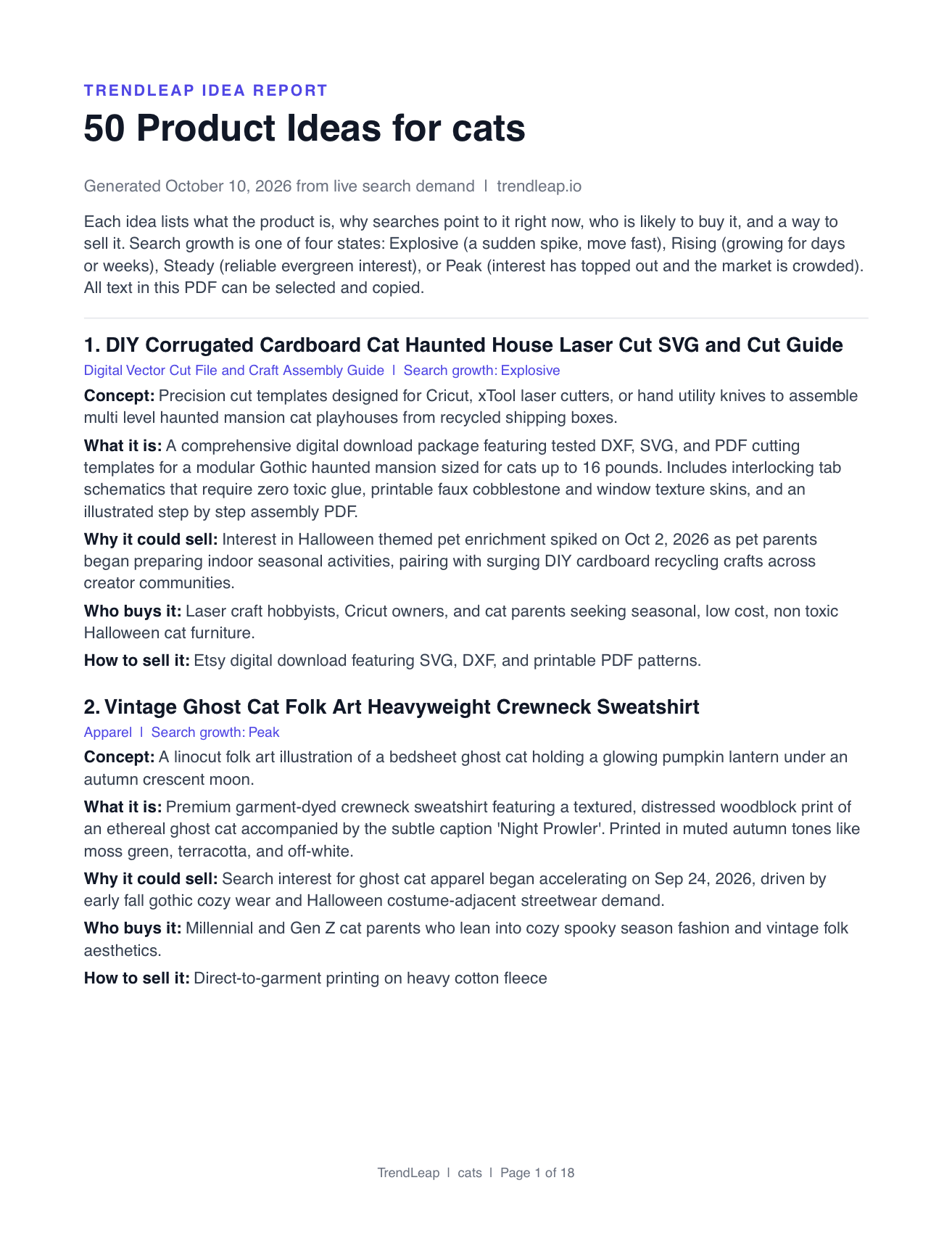
The PDF is plain, selectable text in a single column. That is deliberate. You can highlight an idea and paste it into your notes, a listing draft, or a chat with a designer without fighting the layout. You can see a sample report page before you buy.
Real examples from two reports
These come from reports generated on 10 October 2026. They are shortened here; the report gives the full detail for each.
From a “cats” report: cardboard cat haunted house cut files
A digital download of SVG, DXF, and PDF cutting templates for building a multi-level haunted mansion playhouse for cats out of recycled shipping boxes. Labelled Explosive, with interest in Halloween-themed pet enrichment picking up at the start of October.
Who buys it
Laser craft hobbyists, Cricut owners, and cat owners who want low-cost seasonal cat furniture.
From a “cats” report: vintage ghost cat crewneck
A garment-dyed sweatshirt with a folk-art print of a bedsheet ghost cat. Labelled Peak, which is the report telling you that interest is high but the market is already crowded.
Who buys it
Cat owners who buy cozy seasonal clothing.
From a “dog mom gifts” report: dog sitter care binder
An editable Canva template and printable binder covering feeding routines, medication logs, vet authorizations, and daily report sheets for a sitter. Labelled Rising, tied to people booking holiday travel.
Who buys it
Dog owners leaving their dog with a sitter, boarder, or family over the holidays.
Notice the Peak label on the sweatshirt. The report does not pretend all 50 ideas are equally good openings. Part of its job is to show you which ones are early and which are late.
How to word your niche
What you type shapes what you get, so it is worth ten seconds of thought.
- A broad niche, such as “cats” or “dog mom gifts”, returns a mix of formats: digital downloads, print-on-demand designs, physical products, and gifts.
- A niche that names a format keeps to that format. “Classroom printable” returns printables only. “Cat t-shirt designs” returns shirt designs only.
- An audience works well: “new teachers”, “first-time rescue dog owners”, “brides planning an autumn wedding”.
- Very broad terms such as “gifts” or “home” give scattered results. Add the buyer or the occasion.
What to do with 50 ideas
Fifty is too many to act on, and that is the point. You are buying a list to cut down.
- Cross out anything you cannot make or would not enjoy making.
- Set aside the ideas labelled Peak unless you have a clearly different take.
- Look for clusters. Three or four related ideas can become one coordinated set of listings.
- Shortlist three, then search each one on the marketplace you sell on and look at the listings, reviews, and prices.
- Test the strongest one with a small set of listings before you build a catalog.
If you are new to selling, our guide to whether starting an Etsy shop is worth it walks through a 30-day test you can run with a shortlist like this.
Report, free searches, or Pro?
- Free searches: best for trying TrendLeap. Six ideas per search, with a limited number of searches.
- 50-Idea Report: best when you have one niche and want a deep list once. $6, no account.
- Pro: best when you research often or across several niches. Unlimited searches, plus the Vault for saving ideas.
They are not exclusive. Some sellers will buy a report for their main niche and use free searches to explore side ideas.
What it does not do
The report is built from search behavior. It does not show sales figures for Etsy, Amazon, or any other marketplace, and it cannot promise that an idea will sell. It tells you what people are starting to look for and turns that into specific products. Checking the competition, pricing, and whether you can make the product well is still your part.
Because each report is generated when you order, two reports for the same niche will not be identical, and a report from next month will reflect next month’s searches.
Questions about the 50-Idea Report
How much is the 50-Idea Report?
It is a one-time $6 payment for one niche. There is no subscription and no account to create. Payment is handled by Stripe.
How long does it take to get the report?
Usually one to three minutes after payment. The report is built for your niche at that moment, then downloads as a PDF. A copy is also emailed to the address you used at checkout.
Can I download my report again later?
Yes. The page you land on after paying keeps working, so you can reopen it to download the PDF again without paying again. The emailed copy also includes that link.
Can I ask for only digital products or only t-shirt designs?
Yes. Name the format in your niche, for example “party printable” or “dog t-shirt designs”, and every idea in the report will be in that format. A niche without a format returns a mix.
Is the report the same as six free searches repeated?
No. The report covers one niche from several angles in a single run, such as everyday needs, upcoming occasions, gifts, and underserved buyers, and removes duplicates, so you get 50 distinct ideas.
What if something goes wrong with my report?
If the report fails to build or you cannot download it, use the Contact page and include the email address you paid with. We will get the report to you or sort it out.
Put the Idea to Work
Turn a rising search into your next product brief.
TrendLeap helps you move from trend discovery to a specific idea you can list, test, or build.
Try TrendLeapKeep Researching
Trend reports are for research and inspiration. Results depend on execution, pricing, positioning, and market conditions.